

Your Editable First Day of School Photo Signs!
Quick Jump To » Comments

Personalize it!
Make your CUSTOM First Day of School Sign in 3 easy steps with Design Hero by HWTM:
- Choose your favorite design. (There are 4 options below.) Each design has a link to customize it directly below the example image. Click the link to open that design in our online editor. *Note: The editor works best on desktop computers right now.*
- Add your own details! To edit the text, you can either select it within the design, then click the little pencil icon that pops up OR highlight it in the left side column.
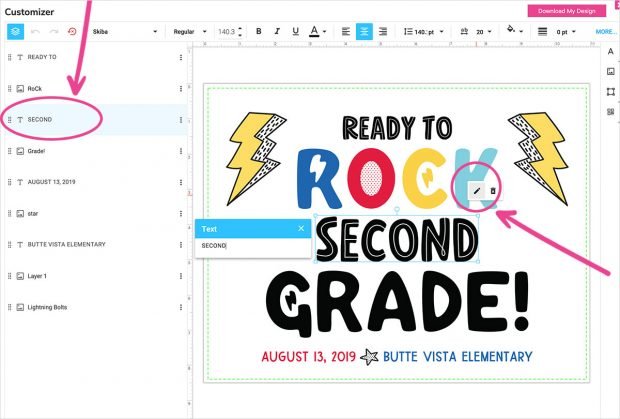
Tip: To move text or graphics around, select-and-drag or use your arrow keys. You can also delete entire lines of text by clicking on the trash can icon. - Instant download. Click the hot pink “Download My Design” button (upper right corner) when you’re ready!
***
Designs:
***

Click here to customize the “Marquee” design!
***

Click here to customize the “Rock” design!
***

Click here to customize the “Doodle” design!
***

Click here to customize the “Arrows” design!

P.S. You can totally print these signs on regular printer paper, but card stock will ALWAYS look better if you’ve got it. This matte photo paper from Staples is what I use for pretty much EVERYTHING I print myself – for parties, signs, cards, etc. It’s been my go-to for years!

***
Psssst…. There’s More!
If you 💛great design, instant access, and making things personal … I’m pretty sure you’re going to love Design Hero! 😉It’s an All-Access Pass to all my best designs, in one convenient spot. Click here to check it out.
8 Comments
Comments are closed.


Thank you for the printables!
You’re very welcome! Thanks so much for taking the time to comment! :)
Jenn, I really, really love the “Ready to Rock” ones, but my computer just spins and spins when I click on “color.”
Help!!
Hi Cassie!
Which browser are you using and are you on a Mac or a PC? The editor seems to be working well in Chrome on both Mac and PC right now, so maybe try that browser if you can. I’m also happy to customize them for you if you can’t get it to work. Please keep me posted. Thanks! :)
I switched to chrome and it worked. Thank you for your help!
My kids love them!
I’m so happy to hear that! Do you mind if I ask what browser you were using before just so we can trouble shoot it? :)
These are amazing and so cute! Bummed they don’t work for Kindergarten though.
Hi Kylie – I know! ugh… I totally blanked on that earlier. If there’s a certain design you’re wanting to use, LMK and I’ll edit it to work for Kindergarten and add it here. ;)